
visibus Blog
Four AI tools for one job - and in the end you retype names by hand

by Fabian Schmid · June 1, 2026 · 7 min read
A friend wrote to me the other day. He manages a few properties, handles tenant communication, contractor invoices, yield calculations - the usual. He wanted to know how to do it more efficiently with AI, and had asked Google directly. He forwarded me the answer because he thought it was "actually pretty good."
And it was. Right up to the last paragraph.
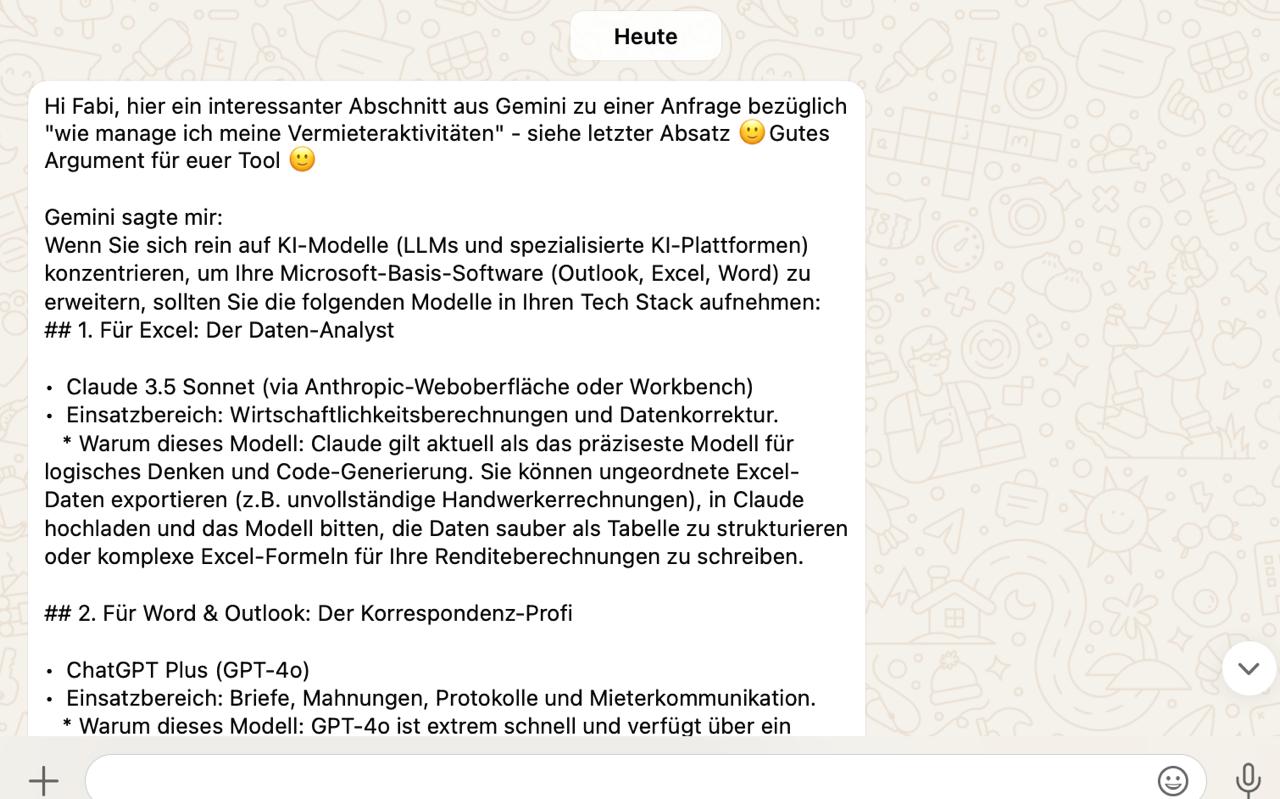
The recommended stack: four tools for one job
The recommendation was cleanly structured. The right tool for each task:
- For the Excel spreadsheets and yield calculations: one model, because it leads on logical math.
- For letters, payment reminders and tenant communication: the next one, because it nails German tone.
- For reading receipts, invoices and scanned contracts: a third, because it handles images and PDFs well.
- And as a "native bridge," the Office-native tool, so you're not constantly copying back and forth between browser and Word.
There's little wrong with any of that on the merits. Each of these models can do exactly that. The problem isn't the selection - it's what that selection means day to day.
Three things that get lost along the way
First: four tools are four tools. Four logins, four interfaces, four flat-fee subscriptions - running every month whether you use them or not - and four places where you have to stop and think, "was I actually allowed to enter that or not?" For one person, that's already a second part-time job. But in a business, it isn't one person doing this - it's half the back office, each with their own logins, their own tools and their own interpretation of "was I allowed to enter that?" The toolbox turns into a free-for-all.
Second - and this is the paragraph where it tipped over: At the end of the recommendation came a data-privacy note. In essence: Don't enter real tenant names, addresses or bank details. Use placeholders like "Tenant_A" and swap them back in only after you've copied the text back into Word.
Read that again. The advice is: anonymize your data by hand before you enter it, then put the real names back in afterward. Manually. On every payment reminder, every statement, every receipt.
That's not just tedious. It's error-prone in the most unpleasant way: it works right up until someone forgets once. For a single person, that rarely happens. Across a whole team typing dozens of messages a day, it's not a question of whether, but when - and there's no place where you'd notice it before it's too late.
Third: a fixed four-tool list like this is already outdated the moment it's written. The specific model versions named will be superseded in a few months, and the next-best model comes from a different provider. Whoever commits to four fixed accounts has built themselves four little dependencies.
This isn't a one-off story
And now the real point: this isn't the worry of a single property manager. It's the situation in every business where people work with sensitive data - the fiduciary firm, the property management company, the medical practice, the HR department. What annoys one person becomes a management problem across a team: no one knows anymore who uses which tool, who enters what, and where the data ends up. That's exactly the point where a "handy AI tool" turns into a data-privacy and control issue that lands on your desk.
How we solve this at visibus
We built visibus Chat for exactly this story. Not as a fifth tool, but as the one that makes the other four unnecessary.
One access point, all models. You log in at a single place and have the leading models from Anthropic, OpenAI, Google and Mistral side by side. One for the yield table, another for the letter, a third for the scanned receipt - or you let the right one be picked automatically. If a better model arrives next month, it's simply there. No new account, no switching.
The anonymization is handled by the software - not by your team, by hand. This is the point that makes all the difference. Wherever you work with sensitive data, you can enable an upstream filter: your team types in the real names, addresses and amounts as normal, and before the request leaves your instance, the filter automatically detects and replaces the personal data. The model sees "Tenant_A," you see the real answer. Exactly the step Google tells you to do - except your team doesn't do it (and forget it), the software does.
"But the request still goes to the US, doesn't it?"
Fair question - and an honest answer: if you use one of the big models, the actual computation runs at the respective provider. For Claude that's Anthropic, for ChatGPT OpenAI, for Gemini Google - all three US companies. visibus doesn't change that. (If you want the processing to stay in Europe too, you pick a European model like Mistral from France - an EU provider.) What matters, though, is what goes there and what stays here - and those are two completely different things.
What goes out is the single request: the current question - and if it refers to a document, the excerpt needed for it. But not your user account, not your document storage, not your accumulated archive. This processing runs over the commercial API under a data processing agreement with EU standard contractual clauses: the inputs are not used for training - unlike the free web apps, which live off exactly that - and are retained only briefly, not stored permanently. Wherever the anonymization filter is active, the names don't even go along in the first place.
What stays here is everything else - and that's by far the larger part:
- Your entire history. Every conversation, over months, sits on your instance in the EU or Switzerland - not in an account with a US provider. With a personal ChatGPT account, your complete history piles up over there under your real name. With visibus it stays with you.
- Your documents and your knowledge base. Contracts, invoices, uploaded files are stored and managed in your instance - in the EU or Switzerland, under local law.
- Who asked what. The link between employees and requests never leaves the building. The provider sees an API key, not your org chart.
- The single control point. Logging, retention and - where enabled - anonymization all happen in one place on your instance, before anything even goes out - not in fifty separate browsers that you have to hope are each set up correctly.
Put differently: the model request is a single question handed briefly through a window. The hosting decides where your filing cabinet stands. And that belongs in the EU or Switzerland - not in someone else's building.
And Copilot?
Fair's fair: the Office-native tool has a real advantage - it lives right inside the document. If your need consists solely of drafting in Word and Outlook, that's a legitimate choice. visibus Chat is the alternative for everyone else: for those who want model freedom instead of a single provider, and want data control not as homework for themselves, but built in.
The point
The Google answer wasn't wrong. It was honest - honest enough to hand you its own catch: "Watch what you enter." We think that catch doesn't belong on the user's desk. It belongs in the software.
If you want to know what this looks like for your specific case - drop us a line. We'll look at it together.